A web push campaign sends short notifications to all or some of your website's subscribers. The message lands on a computer or phone screen within seconds, even when your site is closed. Here are the seven steps that separate a campaign that drives sales from one that makes subscribers leave.
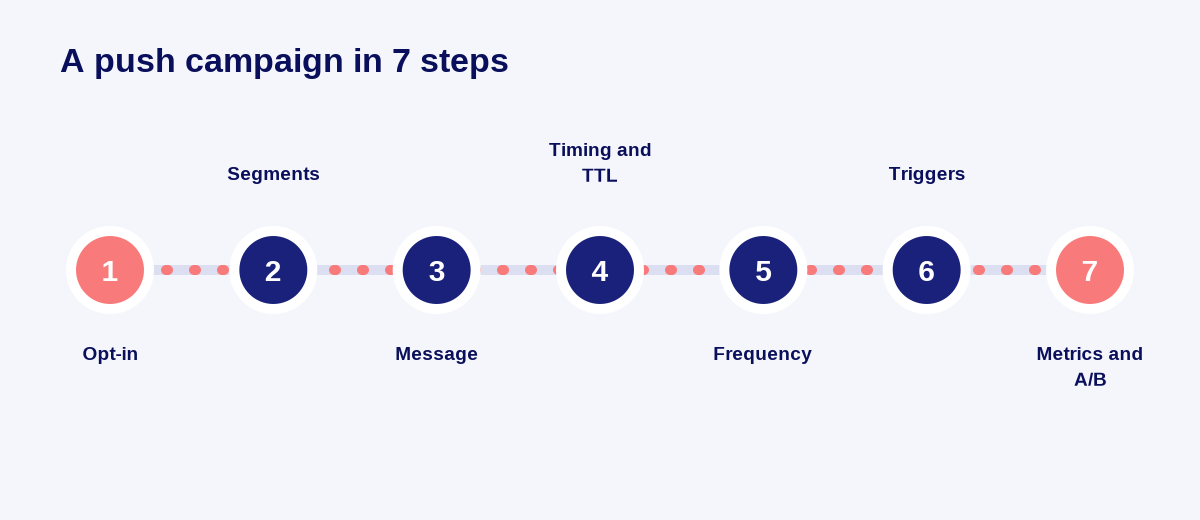
Your site must run on HTTPS. Add the service's script and the service worker file to your site root; it usually takes ten minutes. The key decision here is when to ask for permission.
Asking the moment someone lands is irritating. Chrome and Firefox can collapse pushy prompts into the address bar, and then almost nobody subscribes. Show your own prompt with a clear benefit (“We'll tell you when the price drops”) after the second page view or 30 seconds on the site. Trigger the browser's native prompt only after a click on “Yes”.
The same message to everyone performs worst. A minimum set of segments: interests (sections and products viewed), device, location and days since last visit. More in our guide to segmentation.
A push has five parts: title, body, icon, large image and up to two buttons.
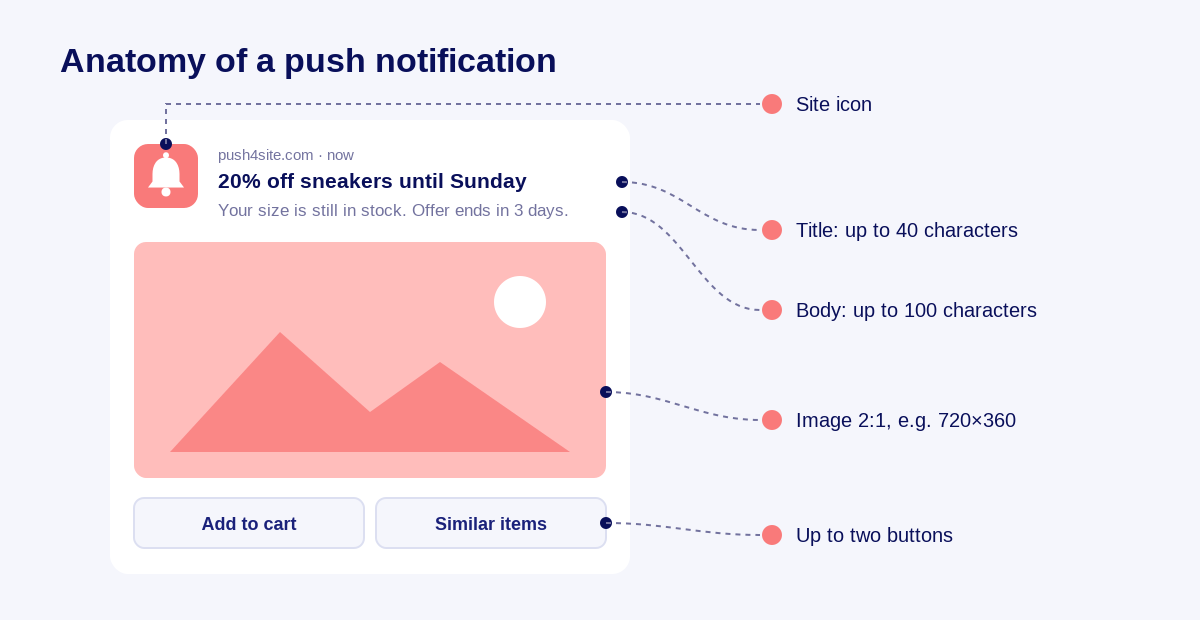
Weak: “Big sale! Visit our website”. Strong: “20% off sneakers until Sunday. Your size is still in stock”. One emoji at the start of the title helps you stand out; five do not.
Send in the subscriber's time zone, not your server's. Online stores often do well at lunchtime and on weekday evenings; news sites in the morning. Only your own data gives the real answer.
Set a time to live. If a sale has ended, someone who turns on their laptop two days later should not get an outdated offer.
Every unnecessary push costs subscribers: unsubscribing takes two clicks, and you can't win that person back. As a rule of thumb, an online store sends 2–4 broadcasts a week; a news site 3–5 a day, breaking stories only. If unsubscribes jump after a campaign, slow down.
Automated messages sent in response to a visitor's actions get more clicks than broadcasts: they arrive at the right moment and are about something the person already cares about. Three flows to start with:
Watch four numbers: delivered, clicked (CTR), unsubscribed, purchased. UTM tags in your links show sales in your analytics. Run every important campaign in two versions; see how to run an A/B test.
Launch your first campaign with Push4site, free for 30 days.
It depends on the service, from free plans to a flat monthly fee. See our pricing breakdown.
Yes, and the browser asks for it: without permission, a push simply can't be delivered.
On Android and iPhone, yes. On a computer it shows up the next time the browser starts, as long as the time to live hasn't expired.

Thanks for contacting us!
We will contact you shortly!
Thank you for registering!
An email with a password was sent to the specified email